Area Below a Line Segment
The area below a line segment that intersects with a rectangle can be used as part of a larger algorithm to find the fraction of a pixel covered by a polygon. This will be used for computing a stencil in a classic stencil-and-cover rendering approach. This section describes a fast, simple algorithm for computing the area. It is suitable for implementation in graphics hardware.
When devising an algorithm for this task, one problem that appears early is the proliferation of configurations of the line segment and rectangle. When we consider all the ways the line can be drawn relative to the rectangle, and all the resulting intersections, there are tens of possible configurations. This is too many to begin analysing. Consequently, the approach we take here involves conditioning the line segment at each step, so that we reduce the number of possible cases. Ultimately just a few possibilities exist at each stage, making the analysis tractable.
Mathematical Outline
First, the line segment will be defined by end points \(\mathbf{p} = (p_x, p_y)\) and \(\mathbf{q} = (q_x, q_y)\), such that \(p_x < q_x\) (strictly less than). If \(p_x = q_x\) then the line segment has no projected area and can be discarded; alternatively it can proceed through the rest of this processing with the ordering of points having no impact. The rectangle shall be aligned with Cartesian axes, extending from \(u_0\) to \(u_1\) along the \(x\)-axis, and from \(v_0\) to \(v_1\) along the \(y\)-axis.
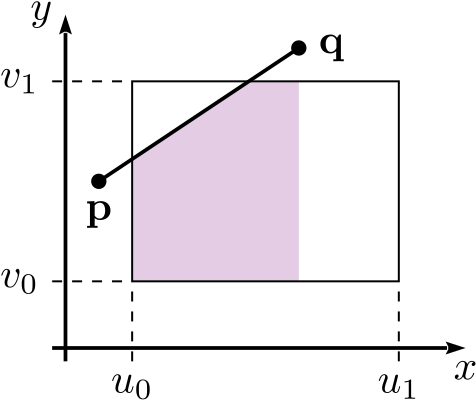
After ordering the ends according to their \(x\) coordinates, we can define the gradient of the line, \(m\):
Next trim the line segment to the vertical lines at \(u_0\) and \(u_1\), producing points \(\mathbf{p}_1\) and \(\mathbf{q}_1\). If the line segment lies completely to the left or right of the rectangle, then both points are placed at the special coordinates \((u_0, v_0)\). Alternatively, the line segment may be discarded in these cases. If the line segment does not cross the rectangle boundaries then no trimming is necessary.
A line segment that spans a rectangle from left to right is shown below, with the corresponding trimming to \(\mathbf{p}_1\) and \(\mathbf{q}_1\).
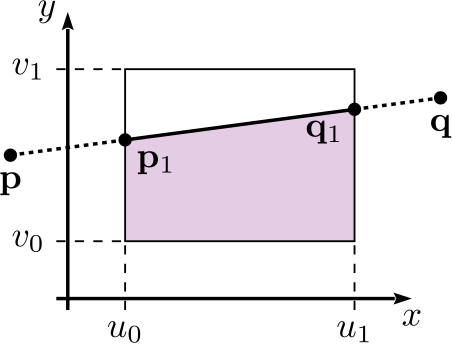
Next, we sort the points according to their \(y\) coordinates, and define points \(\mathbf{a} = (a_x, a_y)\) and \(\mathbf{b} = (b_x, b_y)\), such that \(a_y \leq b_y\):
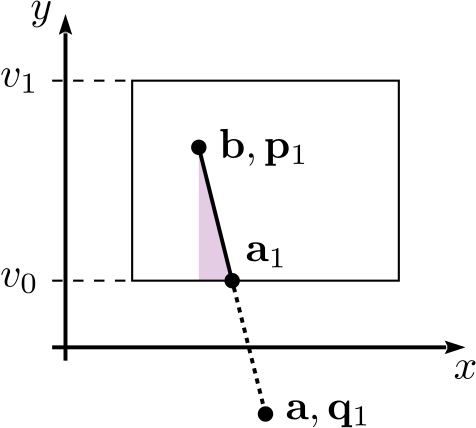
Following this, we trim the line segment horizontally to the bottom of the rectangle, at \(v_0\), to produce point \(\mathbf{a}_1\). Again, if the segment does not cross the bottom border then no trimming is necessary. If the line segment lies completely below the rectangle then it can either be discarded or \(\mathbf{a}_1\) is placed at \(\mathbf{b}\).
Another example line segment is shown below with points \(\mathbf{a}_1\), \(\mathbf{a}\), \(\mathbf{b}\), \(\mathbf{p}_1\) and \(\mathbf{q}_1\) labelled.
Then we intersect (but don’t trim) the line segment to the top of the rectangle at \(v_1\), producing point \(\mathbf{b}_1\). If the line segment lies completely above the rectangle then \(\mathbf{b}_1 = (a_{1x}, v_1)\).
The final point to be generated is \(\mathbf{g}\), found by projecting \(\mathbf{b}\) downward or upward to the top of the rectangle at \(v_1\).
These points are shown in an interactive diagram below. The points at the ends of the line can be dragged to visualize the computed area.
After computing the points, the desired area is given by:
Branchless Algorithm
The steps above can be expressed in a static-single-assignment, branchless algorithm for the area as follows:
rectAreaBelow(px, py, qx, qy, u0, u1, v0, v1):
  -- gradient --
  m := (qy - py) / (qx - px)

  -- p1, q1 --
  -- branch factors
  b1 := min((px >= u1) + (qx <= u0), 1)
  b2 := (px >= u0)
  b3 := 1 - min(b1 + b2, 1)
  b4 := (qx <= u1)
  b5 := 1 - min(b1 + b4, 1)
  -- values
  p1x := (b1 + b3) * u0 + b2 * px
  p1y := b1 * v0 + b2 * py + b3 * (m * (u0 - px) + py)
  q1x := b1 * u0 + b4 * qx + b5 * u1
  q1y := b1 * v0 + b4 * qy + b5 * (m * (u1 - py) + py)

  -- a, b --
  -- branch factors
  b6 := (p1y < q1y)
  b7 := 1 - b6
  -- values
  ax := b6 * p1x + b7 * q1x
  ay := b6 * p1y + b7 * q1y
  bx := b6 * q1x + b7 * p1x
  by := b6 * q1y + b7 * p1y

  -- a1 --
  -- branch factors
  b8  := (by <= v0)
  b9  := (ay >= v1)
  b10 := (ay >= v0)
  b11 := 1 - min(b8 + b9 + b10, 1)
  -- values
  a1x := b8 * bx + (b9 + b10) * ax + b11 * ((v0 - p1y) / m + p1x)
  a1y := b8 * by + b9 * v1 + b10 * ay + b11 * v0

  -- b1 --
  -- branch factors
  b12 := (a1y >= v1)
  b13 := (by <= v1)
  b14 := 1 - min(b12 + b13, 1)
  -- values
  b1x := b12 * a1x + b13 * bx + b14 * ((v1 - p1y) / m + p1x)
  b1y := b12 * v1 + b13 * by + b14 * v1

  -- area --
  area := 0.5 * (a1y + b1y) * abs(a1x - b1x) + (v1 - v0) * abs(bx - b1x)

  return area